seen + learned
Showing posts with label higher education. Show all posts

Focusing on the future – website planning for the International Development Innovation Network

Posted: Monday, March 31, 2014 | Posted by Debby Levinson | Labels: , , , , , , , 0 comments

The International Development Innovation Network, led by MIT’s D-Lab, provides training and resources for innovators worldwide to create new processes and products that improve the lives of people in poverty. IDIN works from the ground up by serving local innovators; community members are most familiar with their own situation, and most motivated to improve it.

We helped the IDIN team organize and narrow down its goals for a new site by developing user scenarios with the team and mapping goals to specific audience needs. Through an interview with the program's sponsors at USAID, as well as a paper prototype review session with summit alumni, we gathered audience feedback on valuable features and expected usage, which provided further insights into how to structure the site and design key interactions.

Moving from audience and feature analysis into information architecture, we led a collaborative workshop with IDIN staff to map content and features into page types and a high-level site organization. This groundwork helped prepare IDIN for usability testing and a full site redesign.

Work included:

  • stakeholder and user interviews
  • user scenarios – based on real people and interactions
  • prototype development
  • site map
  • content inventory and planning
  • high-level wireframes

whiteboard noteswhiteboard notes
Whiteboard notes from content mapping session.

home page wireframe (mobile view)project page wireframe (desktop view)
Left: home page wireframe (mobile view). Right: project page wireframe (desktop view).

MIT Annotation Studio UI

Posted: Monday, April 8, 2013 | Posted by Debby Levinson | Labels: , , , 0 comments

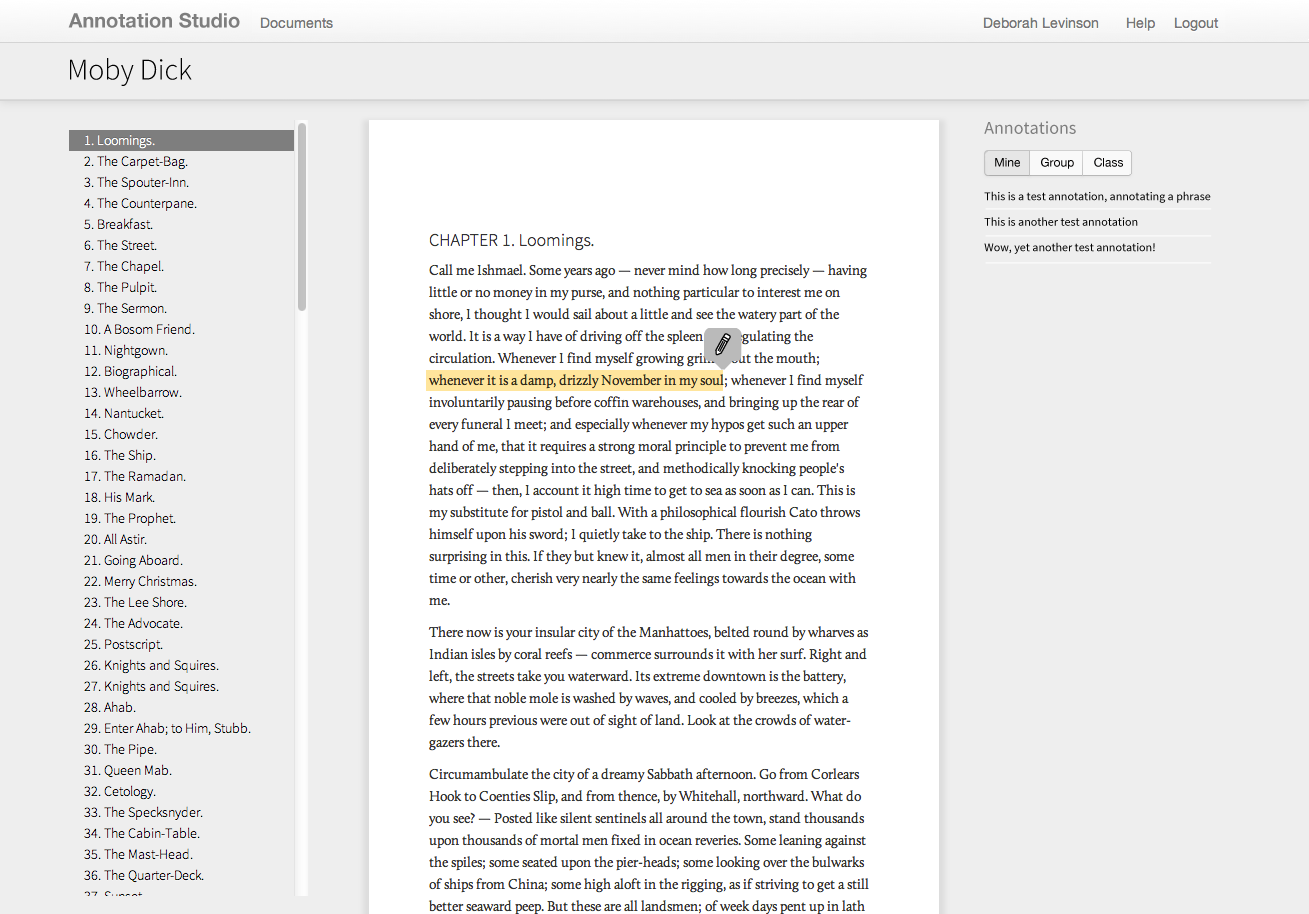
Annotation Studio is a set of collaborative online annotation tools developed by MIT’s HyperStudio program. The software allows students to annotate literary texts and other documents with text, video, audio, and hyperlinks. Students may also view and build upon each other’s notes, allowing for a more participatory experience than traditional solo book review and annotations.

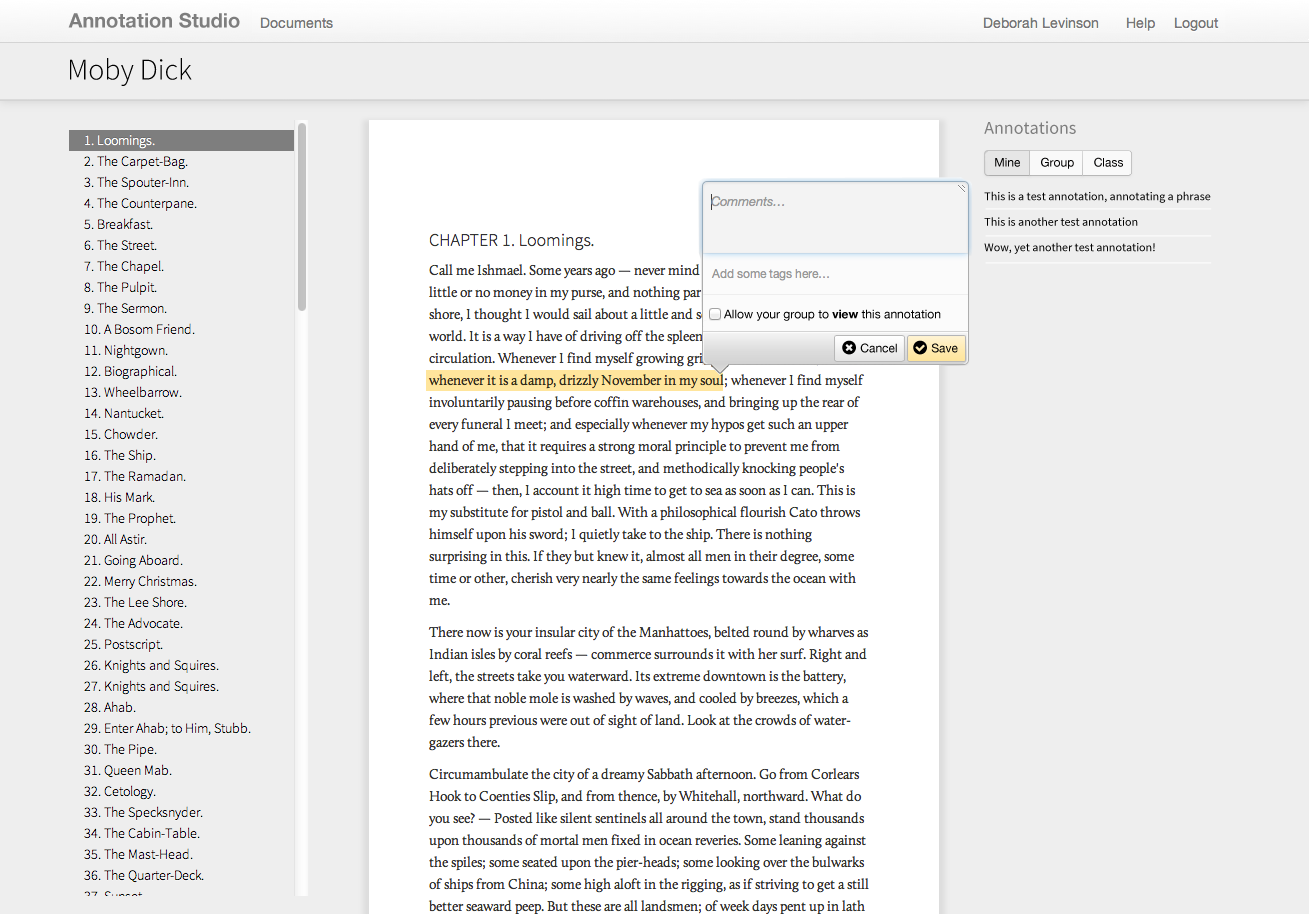
MIT approached us to refine Annotation Studio’s color palette, typography, iconography, and visual approach to displaying annotations and other metadata. To meet technical requirements, we designed styles and visual elements that could quickly be implemented within Twitter Bootstrap.

Work included:

  • Heuristic review
  • Visual design refinement

Annotation Studio documents list
List of documents

Highlighting text to annotate

Saving an annotation

MIT Hyperstudio US-Iran document archive UX and visual design

Posted: Monday, December 12, 2011 | Posted by Debby Levinson | Labels: , , , , 0 comments

MIT’s Hyperstudio developed a faceted database that archived correspondence between the United States and Iran from the 1980s through the late 2000s. Nimble Partners designed an appealing, usable, and culture-neutral interface to help scholars search the database, view documents, and make online annotations.

Home page

Faceted search interface

Document detail view, including annotations area

Quickie "Valued Features" Prototype Test

Posted: Wednesday, July 13, 2011 | Posted by Tania Schlatter | Labels: , , , 0 comments

We were recently part of a team redesigning a student services department website for MIT. A lot of ideas for home page features were discussed at the kickoff meeting. The question quickly became, which of these features, if any, would students value?

Since it was the end of the semester, we had limited access to students. The client team suggested that a lot of students would be at an upcoming event, so we designed a test that they could take in a few minutes at a table near the event entrance.

We created a very simple prototype using OmniGraffle that included a simple black and white mockup of a bare home page frame, and several cutouts of proposed paper features and content elements.


For the test, students selected the paper elements that interested them most and placed them on the paper home page frame while telling us why they'd chosen those elements. We photographed each student's selections as documentation and asked two direct questions from our test plan. With two test facilitators each conducting one-on-one tests, we had 15 responses in less than 20 minutes!


The students got the idea of the paper prototype right away and had no problems understanding the test or the interactivity suggested by the paper features. We heard stories of how they imagined using the new site and the proposed features. The test provided simple data for the "what" and the "why," which helped the group make decisions.

One test gem was that about half of the participants interpreted one of the features differently than intended – they saw a pair of small photos as staff member photos rather than student photos. Since they commented about how nice it would be to see a staff member and click on their contact information, we learned they valued a feature that we hadn't anticipated.

After the test, we tallied which features were selected most, reviewed the reasons students gave us for their choices, and created OmniGraffle wireframes showing proposed content and features based on what we learned.

This test could be adapted to be run remotely via screen-sharing software, such as GoToMeeting. Hand over the keyboard and mouse, and participants can place content and feature elements on an onscreen frame. Either way, it was a quick and effective method to determine what users value.

MIT Biology information design and user testing

Posted: Wednesday, June 1, 2011 | Posted by Debby Levinson | Labels: , , , , , , 0 comments

MIT’s Biology Department wanted to redesign its website to offer prospective and current students a better overview of the research, collaborative mentoring, and career skills the program provides. Having already completed a survey of its students, faculty, and staff, the department had an initial sense of the most urgent problems they needed to solve in the site; specifically, how to drive people to the right content in a site comprising more than 150 pages.

Nimble Partners identified key scenarios of use for the site, analyzed its content, and developed a new information architecture that addressed key user priorities like identifying deadlines and locating faculty and staff. We also designed several rounds of wireframes to dive deeper into content and feature needs. The wireframes served as the foundation for an interactive prototype we reviewed in talking-protocol usability tests with students, faculty, and staff to confirm assumptions and refine site organization and features before visual design began.

Work included:

  • Content inventory and analysis
  • Scenario development
  • Information architecture
  • Usability testing


Home page wireframe


Interior page wireframes for category home (top) and degrees (bottom)


Faculty and staff directory with faceted search


Biology website visual design by Stoltze Design. Development by Indigo Digital and Common Media.

MIT Sloan Faculty Expertise Guide UX, usability testing, and visual design

Posted: Tuesday, October 26, 2010 | Posted by Debby Levinson | Labels: , , , , , , , 0 comments

The MIT Sloan Office of Media Relations connects reporters and members of the media with appropriate Sloan School of Management faculty, researchers, and noteworthy School news and events. To help Media Relations move its printed expertise guide online, we designed an HTML prototype that included faceted search as well as multiple paths into the guide content. We also talked with reporters as they used the prototype and designed features that supported their work habits.

The final site allows reporters to search and browse for experts in multiple ways. Visually, it incorporates elements of the parent Sloan site while serving as a useful and appealing stand-alone application for reporters who go directly to the Guide on a frequent basis.

A year later, as Media Relations launched a blog to support their public relations efforts, we extended the Expertise Guide visual design to a WordPress theme.

Work included:

  • User research and usability testing
  • User interface and user experience design
  • Visual design


Guide home page


Expert detail page


Categories by discipline

Speaking to Students on Designing the User Experience

Posted: Monday, October 4, 2010 | Posted by Debby Levinson | Labels: , , 0 comments

For the past six years, I've been a guest-speaker in Ed Barrett's MIT class 21W785, "Communicating With Web-Based Media." Years earlier, when it was still called "Communications in Cyberspace," I helped informally TA the class, which led to co-authoring The MIT Guide to Teaching Web Site Design with Ed, as well as Suzana Lisanti. (The book is now woefully out of date on the technical side of things, but still has good information about how to plan and organize a class like 21W785.)

I always enjoy speaking to Ed's class, because for many of these students, this is probably their first exposure to a user-centered view of how to develop a complex website or application. Few, if any, have previously had to think about how their site's design – both its user interface and its visuals – needs to please anyone other than themselves.

My goal is to give them tools they can use to get quick feedback, such as sample user interview questions, as well as tools to help turn that feedback into something more concrete to guide them through design and development, such as scenarios, site maps, and clickable wireframes. Given the short timeframe students have to create their projects, Ed and I don't expect that they'll use every tool I give them – but just getting them to start thinking about the people who'll be using what they build is a big step forward, and one that should help them succeed in the professional world.

Slides from this year's presentation are visible below or downloadable from Slideshare.

Tufts University Advancement usability & form design

Posted: Friday, April 16, 2010 | Posted by Debby Levinson | Labels: , , 0 comments

Tufts University’s Advancement group found that two-thirds of the visitors to its online giving form abandoned the page before completing a donation. Although online donations were steady and significant, they knew they needed to improve the form’s usability to encourage donors to pledge money.

We interviewed a cross-section of representative donors, asking open-ended questions to identify patterns of use and watching them interact with the form to determine barriers to making a donation. Based on these interviews, we illustrated and documented recommendations for improvements to the form. A second round of testing, this time on the redesigned form, confirmed that donors found the new interface easier to use.

Work included:

  • Usability tests and results analysis
  • User interface and user experience design recommendations

Original Tufts giving form
Inline observations and recommendations on the original giving form.

Revised giving form
Inline observations and recommendations on the revised giving form.

User scenarios beyond the web

User scenarios have been widely adopted by web designers as a useful tool for helping ensure sites provide what visitors need and expect. Less well-known is that they are also a great tool for ensuring offline communications do the same.

Recently I was in Sears. They have created central checkout kiosks at my local store (Cambridge, MA) which is a step forward, because previously, it was impossible to find a cash register and a salesperson at the same time. Now there's a large checkout hub at the exit/entrance to the connecting mall. When I entered the store I came from downstairs – not from the mall. I did not pass a kiosk. I shopped and could not find where to pay. I looked for signs, and found this (pardon the fuzzy, surreptitiously shot image).


The sign points to a wall. There's no pay kiosk on either side of the wall.

This could be blamed on a number of things, but for the sake of this post I'm going to pin it on a lack of user scenarios when the store was planning the pay kiosks. If, when someone in Sears corporate offices was thinking about or planning the kiosks, the context of shoppers making purchases came up, hopefully they would have realized that finding where to pay is just one part of a flow that ends with paying – that paying is a part of a larger scenario.

A few years ago, we worked with the marketing team at Sloan Executive Education. They run programs that are attended by professionals from all over the world. Aware that there was a flow of information, and that it needed to be consistent to ensure that expectations were met, we mapped out scenarios related to how potential participants found out about the programs, registered, made travel plans and arrived at the program. After listing all the recipient types and situations, we could evaluate the communications and see where information needed to be changed, added or made more consistent.

There are hybrid online/offline situations that call for scenarios as well. Hospitals can have complex and inconsistent technical setups that send healthcare workers back and forth between paper and electronic files. Working with a client who provides software to streamline hospital discharge, we needed to design a fax form that would literally connect paper and digital correspondence. Care facilities received faxes from hospitals to let them know there was a potential patient for them. Included in the fax was a unique code that, when entered on a website, would provide the patient details and acceptance information. We used scenarios that captured the full flow of contact – online and offline. Because we looked beyond the web interactions we were able to design a complete system that worked, not just a form or site that only addressed part of the situation.

Higher education: the destination site is not dead

Posted: Tuesday, November 17, 2009 | Posted by Tania Schlatter | Labels: , , 0 comments

The pace and rate of technological change is dizzying. We are seeing and hearing many organizations become disoriented. In higher education as with any organization, when there are funds there is a tendency to want the latest and coolest. The possibilities available - cheap and fast streaming video, presentation design "skins" that change on the fly, the ability to aggregate and display content from a wide variety of sources - are tempting.


Critical thinking must be present in the higher education site redesign process. Like the dessert table at a great buffet, it is easy to over do it, and forget about providing the nutrients your body (like your site visitors) need.

Bottom line - if you are a site for a department at a college or university, your site visitors need facts. They need to know what the department is. They need to know how they might engage with you and for what. They need to know who is in charge of what and who to contact for what. They need to know how your department or organization may be connected to others or the university as a whole. Prospective and current students and their parents get a huge amount of their information from the internet. They are relying on your institution or department's site for the details they need. There are many, many sites that provide inspiration on every topic imaginable. Chances are, if you have a current or potential student on your site, or even a donor, they have been to those sites and are already inspired. They are on your site to move forward and take action - to go beyond inspiration and act.

Organizations must ask themselves - are they in the media business? If not, how cool and inspiring is your cutting edge site going to be in a few months when the content needs updating? How impressive will it be when news feeds pull in content that isn't what your audience is looking for or have already seen somewhere else?

Higher education sites are destinations. Ideally, they do both - inspire the visitor by reassuring them that they are in the right place for their interests (video could really help here), and help them engage. This takes more facts than flash, more veggies than dessert, smelling salts and a heavy dose of restraint (also known as user research).

Using card sorts with storytelling to get off to a great start

Posted: Sunday, March 22, 2009 | Posted by Tania Schlatter | Labels: , , , , , 0 comments

Working with non-profits often means large teams with multiple stakeholders, each with a list of desired features and improvements that may have been in the works for years. The expectation level is high – funding has finally been approved, a target launch date planned and everyone knows just what they want – in fact, a site map has been developed. While each stakeholder is trying to address the perceived needs of their audience, when it all gets put together the results can be unprioritized and sprawling. The team may have been meeting for months and are looking for the designers to pick up the ball and run. However, committee-driven IA can be so democratic that it can miss providing the information that site visitors are looking for in the way they expect to find it. Our favorite path to a successful project with multiple stakeholders is holding card sort/participatory design sessions with storytelling as soon as possible.


Traditional card sort sessions involve gathering data from participants by having them sort terms into groups that make the most sense to them. These sessions are a valuable tool for creating navigation that makes sense to the people who will use the site. A large numbers of participants (>30) is needed to provide the data, and software to sort the responses is helpful. While traditional sorts are not difficult to do, we have found that having sessions with fewer participants (5-12) and mixing approaches provides input that covers several areas beyond defining appropriate navigation categories.

When sessions include prompting participants to tell stories about a specific time they used a site, perform a card sort, and use cards to position content and features on a page the way they'd like to see it the data is deep and rich. The results provide a clear picture of each person's mindset, and how that mindset affects how they think about content, categories and what they value. Patterns emerge that point to pretty clear user group needs. While it doesn't provide deep statistical data, it does provide rich scenarios of use and an understanding of needs and values that is just what we need to get buy in from stakeholders to prioritize the feature list and focus the IA on the top issues and most common situations.

MIT Human Resources IA & visual design

Posted: Sunday, July 20, 2008 | Posted by Debby Levinson | Labels: , , , 0 comments

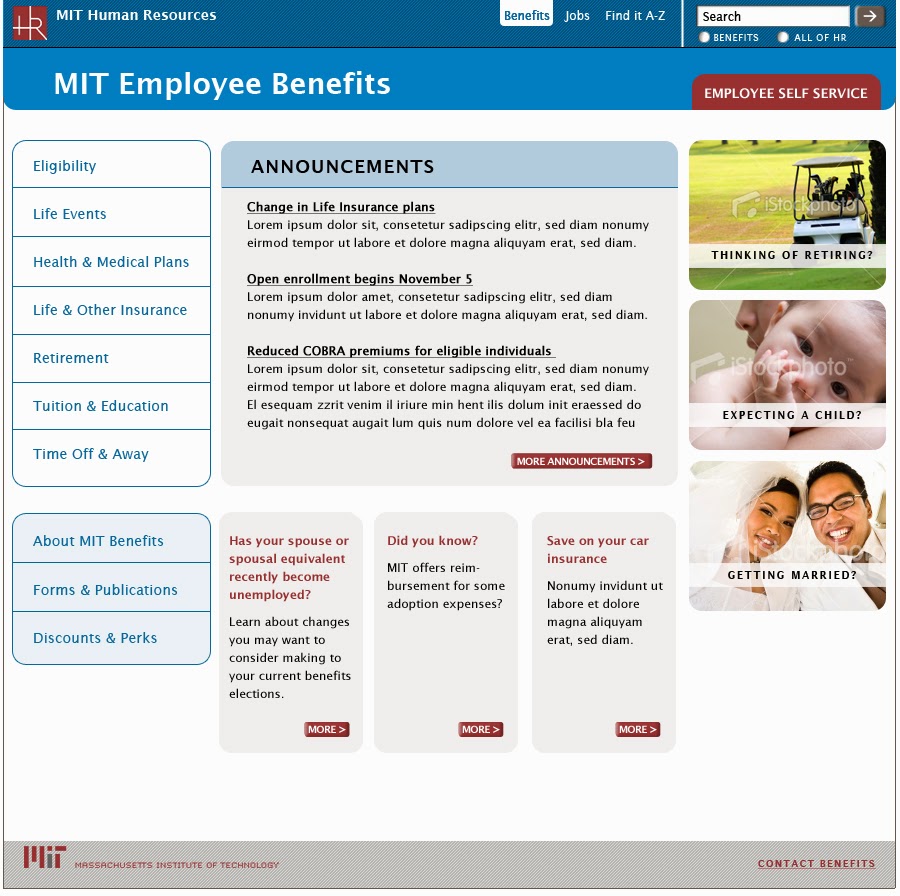
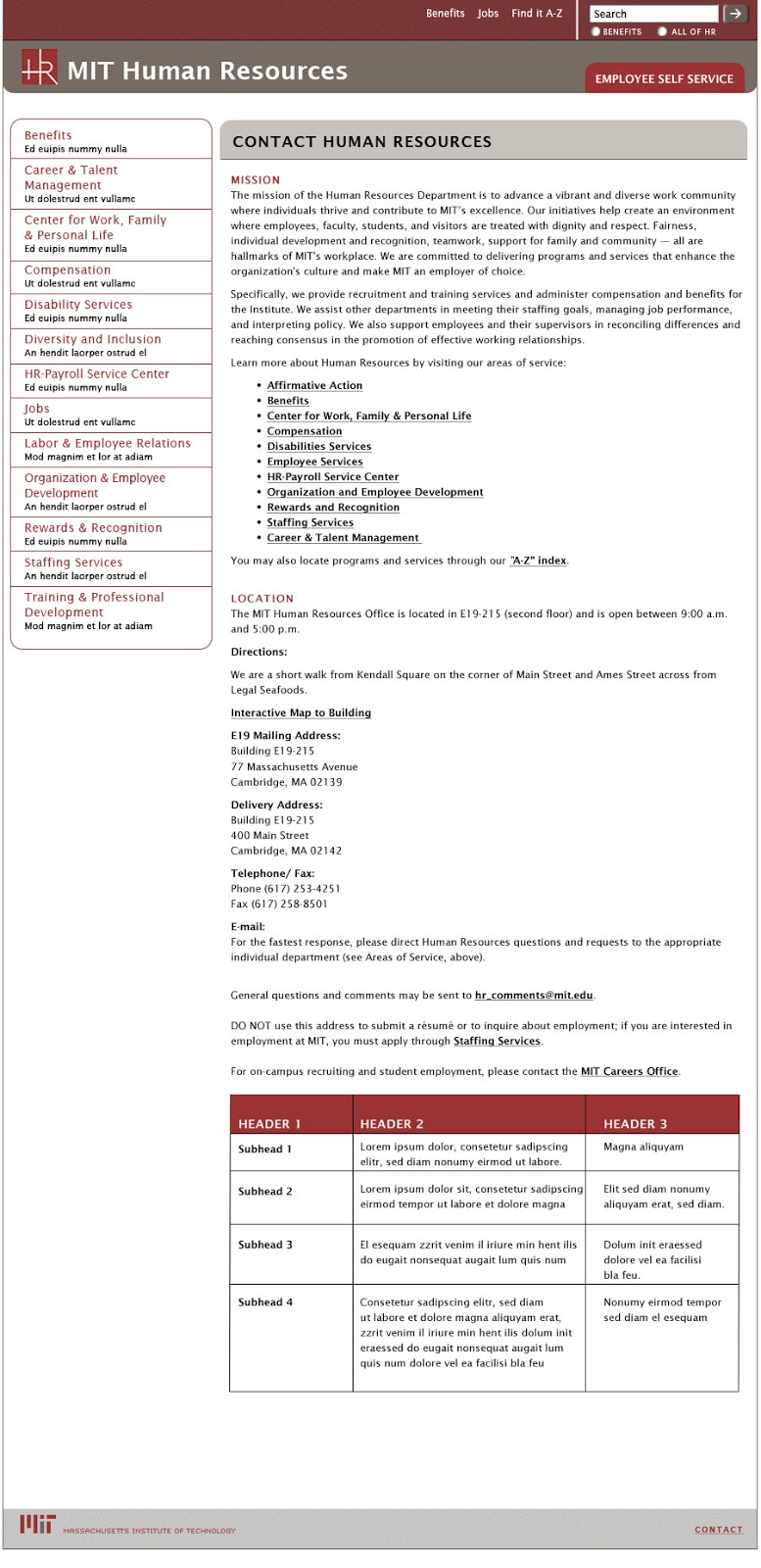
MIT Human Resources encompasses many groups, each with their own site and content and promotional needs. The Benefits Office, HR’s largest and most frequently used website, needed a template system they could use to provide structure for the vast amount of content they publish. The system had to be flexible enough to allow Benefits to promote time-sensitive news in multiple ways, while at the same time establish conventions for navigation and information hierarchy to improve usability.

Nimble Partners designed a visual system that establishes conventions for all sites such as a grid, typography, and navigation. Each site uses its own color palette and can display unique elements, like logos, but still appears part of the HR family and can be easily edited in Drupal's CMS. As the HR Communications Manager said to us: "Hope you’re as pleased by your labors as we are!"

Benefits home page
Benefits Office home page

Benefits lower-level page
Benefits Office lower-level page

HR home page
Human Resources home page

HR lower-level pages
Human Resources lower-level page

color palette
color palette applied to subsite templates
Human Resources site color palette (top); palette applied to subsite templates (bottom)