
Catapult.org is a Webby-nominated crowdfunding website devoted to projects that improve the lives of girls and women worldwide. Nimble Partners worked with Catapult's founding team from concept to launch to define the overall user experience, specify all content and interactions, and work with visual design and development.
UX work included exploring engaging ways to find projects, testing an interactive prototype, and specifying all administration features for the site.
We're thrilled that in the first year 286 projects were funded, and that the site is going strong!
Home page wireframe:

Home page, designed by Hyperakt and developed by Mindgrub based on our wireframes and information architecture.

Working out content and features for the project page:

Project page, designed by Hyperakt and coded by Mindgrub:

Teams page wireframe:

Teams page, designed by Hyperakt and coded by Mindgrub:

Sample administrative interface screens:


Catapult.org user experience
Posted:
Wednesday, October 3, 2012 |
Posted by
Tania Schlatter
|
Labels:
content planning,
portfolio,
user experience,
user interface
0
comments
Evidence for Action – UX & IA for MamaYe websites
Posted:
Wednesday, September 19, 2012 |
Posted by
Tania Schlatter
|
Labels:
information architecture,
non-profit,
portfolio,
user experience,
wireframes
0
comments
Evidence for Action (E4A) is a five-year program designed to improve maternal and newborn survival in Ethiopia, Ghana, Malawi, Nigeria, Sierra Leone, and Tanzania.
We worked with E4A to develop the user experience for six country sites and one umbrella site, defining content and interactions to serve NGOs, local advocacy workers, and pregnant women, among others. Since some audiences would primarily access the site through mobile phones with slow connections, the sites had to keep performance and usability in mind while providing critical features, such as publishing tools and a dynamic catalog of downloadable advocacy materials.


Wireframe for MamaYe "parent" site home page, left, and country home page, right. The parent site provides an overview of the initiative and aggregates downloadable resources from all six countries.

Final parent site home page, left, and Sierra Leone home page, right. Designed by Georgia Lee and Jordan Chatwin of Advocacy International and developed by Catch Digital based on our wireframes and information architecture.
MIT Hyperstudio US-Iran document archive UX and visual design
Posted:
Monday, December 12, 2011 |
Posted by
Debby Levinson
|
Labels:
higher education,
portfolio,
user experience,
user interface,
visual design
0
comments
MIT’s Hyperstudio developed a faceted database that archived correspondence between the United States and Iran from the 1980s through the late 2000s. Nimble Partners designed an appealing, usable, and culture-neutral interface to help scholars search the database, view documents, and make online annotations.
Home page
Faceted search interface

Document detail view, including annotations area
User experience for software and service updates
Posted:
Thursday, October 20, 2011 |
Posted by
Tania Schlatter
|
Labels:
design tips for web app developers,
marketing,
servicedesign,
user experience
0
comments
Changes to the things we use every day affect us and how we feel about the organizations that push change on us. Every time we decide to allow an update or buy a new release, we are taking a leap of faith. Sometimes those leaps are rewarded, and sometimes they are not.
Regardless, our time is required to relearn, and this investment is not acknowledged or appreciated. I've read that brand loyalty is at an all-time low. People are happy to try new restaurants and services with a coupon from Groupon, but vendors report that coupon use is not translating into repeat business. I don't know statistics about mobile and computing software specifically, but based on my extremely limited and unscientific example of myself I can only imagine that maintaining a positive customer experience after purchase is valuable.
Four tips for better software update experiences:
- Show me what I can expect. Let me preview what will change visually, not in a readme file after the fact. Google is doing this well with its beta interfaces.
- Let me choose. Give me a choice to retain an old interface. Twitter, Yahoo!, and Google have all allowed users the choice between new beta interfaces and the familiar old ones, even if eventually these choices were taken away.

- The UI should always be a high priority. I've seen more beautiful launches than I can count that degrade with the second release. It's great that the UI/UX were stunning at first, but if feature fixes and additions compromise the UI in subsequent rounds, the initial effort truly was for naught.
- Assume people will hate it. Your organization may think that the update is great and fixes all kinds of issues, but chances are users aren't aware of the problems; they're only aware of the change. If you keep in mind that people will hate the update, it's more likely that changes will be made in a way that has less negative impact on consumers – and communications will be less about what the organization thinks is better, and more about what people can expect.
Where's this coming from?
Recently, I downloaded an update for my Android mobile phone. I didn't think about it much before doing it. I saw the prompt, figured I had enough connection strength and time for the update, pushed the button and put the phone back in my bag.
 |
| image source: http://gadgetian.com/5770/verizon-moto- droid-pro-software-update/ |
Taking a glance later, it was immediately clear that the interface had changed. One of my favorite things about the phone was the lovely graphic that reflects the time of day. Now, instead of late afternoon sunlight, I saw a generic blue screen and the time. Sigh. A few taps and I saw that the entire black-background, high-contrast interface had been brightened, buttons outlined with white hairlines, more prompts added. Clearly someone was trying to improve something, but even though I am usually on the designer's side in this situation, I was just annoyed that things had changed, that the changes appeared to be for the worse, and that I hadn't been warned. The thought crossed my mind that I could change to another carrier with another phone with a more appealing interface. If I have to adapt, I might as well adapt to something else.
No one likes change, even when it's for the best; it takes time and reflection to realize and appreciate change. A few years ago, I facilitated a working session for an organization to help them decide what values were important to convey as part of a new visual identity. In the session, there was a lot of excitement about the future for the group and its ability to be thought of as cutting-edge. When it came time to review logos that had been designed to reflect the key adjectives the organization wanted to portray, the same group overwhelmingly favored the identity that was least changed and most conservative. Asked to explain their choice, they cited the history of the organization and the need to appear consistent – the opposite of what they previously wanted to convey.
Consumer products and services are user experience-crazy right now, with everyone across all levels of organizations getting that experience matters. (Thanks, Steve!) Despite the desire to create products and services that people love, the software world manages product changes extremely poorly. The phone is one recent example; Netflix's proposed service changes are another. I know graphic designers who are running an operating system and software from 2005 because they are so afraid of the interface changes and the time needed to remaster the software with each release.
Helping customers manage software update changes is a seemingly small way organizations can go beyond saying customers matter and show customers that they matter.
4INFO admin UI design
Posted:
Tuesday, October 11, 2011 |
Posted by
Debby Levinson
|
Labels:
enterprise,
portfolio,
user experience,
user interface,
visual design,
wireframes
0
comments
4INFO, a mobile ad delivery and analytics company, needed help evaluating a mobile ad campaign management platform's alpha interface for potential UX design issues. Nimble Partners reviewed the interface in progress and honed its feature set and application flow through multiple rounds of discussion and wireframing. We also designed visuals for the application and consulted with the development team as they applied the new look and feel.
Work included:
- UI and UX analysis and design
- Wireframing
- Visual design


Wireframes for campaign page (top) and campaign edit flow (bottom)


Visual designs for campaign page (top) and campaign edit flow (bottom)

Application color usage guide
Improving the usability of Google Flights' Limits tool
Posted:
Wednesday, September 21, 2011 |
Posted by
Debby Levinson
|
Labels:
usability,
user experience,
visual design
0
comments
Recently, Google launched its new Flights service. It's got a nice, clean UI that falls in line with Google's new design approach for all its applications: crisper typography and bolder colors that guide the eye and enhance readability, and layouts that work smoothly across multiple web and mobile platforms.

For the most part, I like the interface. The map interactions are obvious, and there's a refreshing simplicity to the few controls on the page. But there's one part that's still suffering from Google's classically engineer-driven approach: the Levels widget meant to help you optimize flight time vs. price.
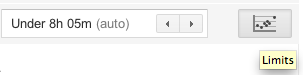
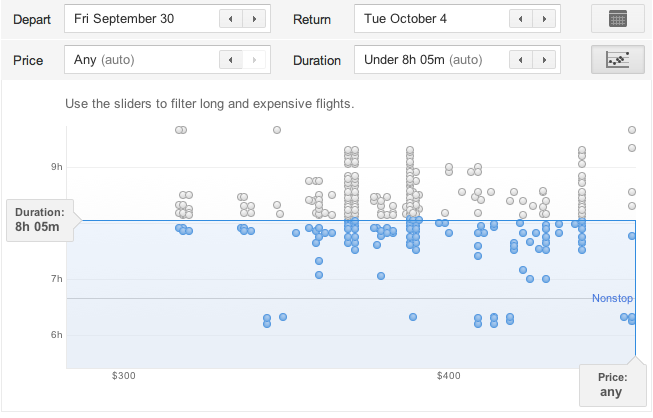
Problem #1: A name like "Limits" is no incentive to click. I clicked only because I was looking around the interface for the first time and had professional curiosity about what Google was up to here. At minimum, the tooltip should use a verb to encourage clicking: "Set flight limits." Better: "Limit flight times and prices."
Problem #2: What the heck is it? Okay, the little icon implies I'm going to get a chart of some kind, and sure enough, it's a scatter plot. But I spent longer staring at this chart trying to figure out how to use it than I should have, and I believe most people will have this same huge "stop and think" moment. Highly informal polling of my Twitter followers, most of whom are in the 25-45 age range and comfortable enough with computers to be regular Twitter, Facebook, and Google application users, confirmed that my most nontechnical followers had "no idea" (a direct quote) what they were looking at. Only the two friends who were heavy Google tool users figured out the widget and its interactions immediately.
In fairness, this tool may have been designed for a more technically minded audience. But a few simple fixes could open it up to a wider audience and help make it indispensable.
Problem #3: How do I use it? Where do I start? The slider handles that don't even look like clickable, draggable slider handles until you roll over them? The dots that only give you information on rollover if they're inactive? The badly written, almost invisible help text that implies you're filtering to find the longest, most expensive flights? My two Google-veteran followers knew what to do, but everyone else was stymied at least for a little while.
Possible fixes:
- Rewriting the help text. For example, "Drag Duration and Price bars to filter your results below."
- Make the Duration and Price bars feel inviting and clickable. Change the color to the Google blue and/or add a little dimensionality to them; both design choices look valid under Google's new design scheme.
- While you're at it, make the blue bars draggable, too.
- Add rollovers for the active dots – even just the airline name, flight duration, and price would be enough to reinforce the dots' relationship to the results below.
Flights is a very young Google product. I'm sure Google plans to keep updating it, and hopefully future versions of the Limit tool will be revised to improve its ease of use. I know I'll be keeping an eye on it.
Quickie "Valued Features" Prototype Test
Posted:
Wednesday, July 13, 2011 |
Posted by
Tania Schlatter
|
Labels:
higher education,
prototypes,
user experience,
user research
0
comments
We were recently part of a team redesigning a student services department website for MIT. A lot of ideas for home page features were discussed at the kickoff meeting. The question quickly became, which of these features, if any, would students value?
Since it was the end of the semester, we had limited access to students. The client team suggested that a lot of students would be at an upcoming event, so we designed a test that they could take in a few minutes at a table near the event entrance.
We created a very simple prototype using OmniGraffle that included a simple black and white mockup of a bare home page frame, and several cutouts of proposed paper features and content elements.


For the test, students selected the paper elements that interested them most and placed them on the paper home page frame while telling us why they'd chosen those elements. We photographed each student's selections as documentation and asked two direct questions from our test plan. With two test facilitators each conducting one-on-one tests, we had 15 responses in less than 20 minutes!

The students got the idea of the paper prototype right away and had no problems understanding the test or the interactivity suggested by the paper features. We heard stories of how they imagined using the new site and the proposed features. The test provided simple data for the "what" and the "why," which helped the group make decisions.
One test gem was that about half of the participants interpreted one of the features differently than intended – they saw a pair of small photos as staff member photos rather than student photos. Since they commented about how nice it would be to see a staff member and click on their contact information, we learned they valued a feature that we hadn't anticipated.
After the test, we tallied which features were selected most, reviewed the reasons students gave us for their choices, and created OmniGraffle wireframes showing proposed content and features based on what we learned.
This test could be adapted to be run remotely via screen-sharing software, such as GoToMeeting. Hand over the keyboard and mouse, and participants can place content and feature elements on an onscreen frame. Either way, it was a quick and effective method to determine what users value.
Subscribe to:
Posts (Atom)
What we're reading


Subscribe To


 Posts
All Comments
Posts
All Comments